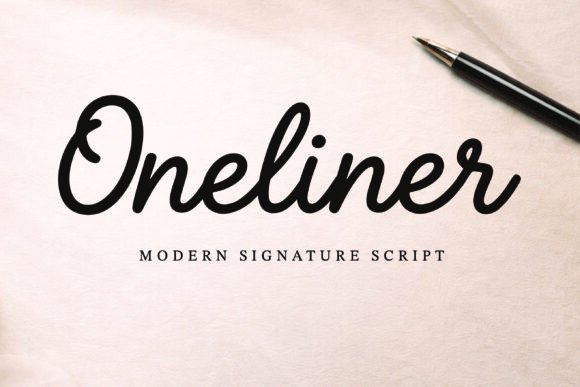
Oneliner: The Elegant Script Font for Modern Designers
There's a particular challenge in digital design: making something feel genuinely personal and human. We work with pixels, vectors, and perfect grids, yet our goal is often to evoke warmth, authenticity, and a personal connection. This is where the choice of typography becomes less of a technical decision and more of a strategic one. A font like Oneliner, a modern signature script, steps into this space not just as a set of characters, but as a bridge between digital precision and the organic feel of a human hand. Its clean monoline style and smooth, flowing strokes offer a sophisticated yet approachable voice, making it a valuable tool for anyone looking to inject personality into their creative projects.
More Than Just a Pretty Script: Understanding Oneliner's Visual DNA
At first glance, Oneliner is defined by its elegance and simplicity. It’s a premium font that avoids the overly ornate flourishes of traditional calligraphy, opting instead for a refined, contemporary aesthetic. The consistent weight of its strokes—the "monoline" quality—ensures it remains highly readable, even at smaller sizes or in longer phrases. This is a critical distinction. Many script fonts sacrifice legibility for style, but Oneliner strikes a balance. The letterforms connect naturally, mimicking the fluid motion of writing with a quality pen, but with a clarity that makes it versatile for both display and functional text.
This design philosophy makes it more than just a handwritten font; it's a modern typeface with a distinct personality. It feels confident without being loud, personal without being messy. For a designer, this means it can carry the weight of a brand's voice or the intimacy of a wedding invitation with equal grace. It doesn't scream for attention but rather draws the viewer in with its quiet sophistication, making it an excellent foundation for visual consistency across various applications.
Practical Applications: Where Oneliner Truly Shines
The true test of any creative font is its performance in the wild. Oneliner's clean elegance makes it adaptable across a surprising range of mediums, serving as a unifying element in a brand's visual ecosystem.
- Branding & Logo Design: For businesses that want to project an image of craftsmanship, boutique quality, or personal service, Oneliner can form the core of a logo design. It works beautifully for bakeries, boutique consultancies, lifestyle brands, artisanal product makers, and creative agencies. Paired with a simple sans-serif for body text, it creates a compelling contrast that feels both professional and approachable.
- Packaging & Physical Products: On a product label, hang tag, or box, Oneliner adds an instant touch of quality and care. Imagine it on a candle label, a skincare bottle, or a gourmet food package. It suggests the product inside was made with attention to detail, enhancing the unboxing experience and reinforcing brand recognition.
- Social Media & Digital Presence: In the fast-scrolling world of Instagram or Pinterest, a display font like Oneliner can stop the thumb. Use it for impactful quotes, story highlights, sale announcements, or as a header font in graphics. Its readability ensures your message gets across instantly, while its style boosts audience engagement by making your content feel more curated and intentional.
- Editorial & Print Design: From magazine pull quotes and chapter headings to elegant restaurant menus and event posters, Oneliner brings a human touch to editorial design. It’s particularly effective in layouts where you want to draw the eye to a key piece of text without resorting to bold or italicized sans-serifs, which can feel clinical.
- Invitations & Stationery: This is its most natural habitat. For wedding invitations, save-the-dates, thank you cards, or business stationery, Oneliner provides the perfect blend of formality and warmth. It feels personal, as if each piece was individually addressed, elevating the entire experience for the recipient.
Strategic Typography: Making Oneliner Work for Your Goals
Choosing a font is a design decision, but using it effectively is a strategic one. Here’s how to leverage Oneliner to meet specific project objectives.
Enhancing Professional Presentation: The key to using a script font without looking amateurish is restraint and pairing. Oneliner shines as a headline or accent font. For web design or a PDF report, use it for main headings (H1, H2) or call-to-action buttons, but pair it with a clean, neutral sans serif font or a classic serif font for body copy. This creates a clear hierarchy that guides the reader's eye and maintains readability across long paragraphs.
Building a Cohesive Brand Identity: Consistency is the bedrock of strong branding. By defining Oneliner as your brand's signature script, you create a recognizable visual element. Use it in the same way across your website headers, social media bios, email signatures, and packaging. This repetition builds a subconscious association with your brand's personality—be it elegant, creative, or trustworthy—strengthening overall brand identity.
Improving Audience Connection: People connect with what feels human. Oneliner's authentic handwritten feel can make marketing materials feel less like a corporate broadcast and more like a personal note. Use it in a thank-you message on a receipt, a handwritten-style note in a shipment, or a personalized quote in a newsletter. This small touch can significantly boost perceived value and customer loyalty.
A Designer's Checklist for Using Oneliner
Before you integrate any new design asset into your workflow, a little due diligence goes a long way.
- Test Your Pairings: Don't assume. Create a mock-up with your chosen body font. Check the contrast in weight and style. Does the combination feel balanced or chaotic? Tools like font pairing websites can provide inspiration, but always test in your specific context.
- Review All Included Styles: A commercial font like Oneliner often comes with more than just standard letters. Check for alternates, ligatures, and swashes. These extra glyphs can add flair and uniqueness to your designs, helping you avoid a "cookie-cutter" look. Ensure the font file you have includes these OpenType features and that your software supports them.
- Readability at All Sizes: Zoom out. Can you still read a tagline set in Oneliner when it's small on a mobile screen? Test it in both digital and print contexts if your project spans both. Its monoline design generally holds up well, but always verify.
- Licensing for Your Needs: This is non-negotiable. If you're using Oneliner for a client project, merchandise for sale, or a large-scale print run, you need to ensure you have the correct commercial license. Most reputable font foundries are clear about their licensing terms—whether it's for desktop, web, or app use. Respecting these terms protects you legally and supports the type designers who create these valuable tools.
In the end, typography is about communication. Oneliner offers a specific voice: one of modern elegance, personal touch, and versatile charm. It won't be the right choice for a tech startup's corporate report or a government form, but for the vast landscape of creative and commercial projects where human connection is key, it’s a powerful and sophisticated option. Its value lies not in being the loudest font in the toolbox, but in being the one that can whisper with clarity and impact, making any project it graces feel a little more considered and a lot more personal.